Configuration
Settings
Every section of the in-shell Settings panel, where values are stored, and which changes apply live.
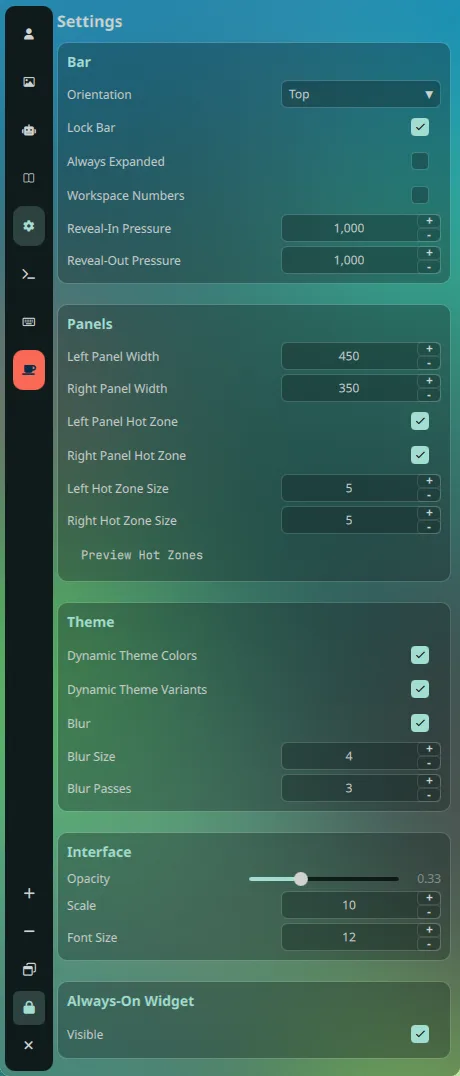
The Settings panel is a tab inside the left panel. Open the left panel with
SUPER + L and select Settings. The panel keeps a category rail on the
left that follows the scroll position, and a searchable list of sections on the
right.
Values are persisted by the Quickshell Settings singleton to:
~/.cache/quickshell/settings/settings.jsonThe shell reads the file at startup and rewrites it after changes. The file is an implementation detail: prefer the panel, because it normalizes invalid values and updates running widgets. Editing the JSON while the shell runs can be overwritten.
Sections#
Bar#
| Setting | Default | Notes |
|---|---|---|
| Orientation | Top | Top or bottom edge for the bar. |
Additional bar behaviour is stored in the settings data (barSmartHide,
barFullWidth, reveal pressures) and is covered in Bar.
Panels#
| Setting | Default | Range / notes |
|---|---|---|
| Left panel width | 400 px | 200–1500 px, per monitor |
| Right panel width | 350 px | 200–1500 px, per monitor |
| Left panel hot zone | on | Hover the left edge to open the panel |
| Right panel hot zone | on | Hover the right edge |
| Left hot zone size | 5 px | 1–50 px hover strip |
| Right hot zone size | 5 px | 1–50 px hover strip |
| Preview hot zones | — | Flashes the hover strips on screen |
Width overrides are stored per monitor name. A monitor without an override uses the global width.
Theme#
| Setting | Default | Effect |
|---|---|---|
| Dynamic theme colors | on | Recolor the shell from the current wallpaper palette |
| Dynamic theme variants | off | Let ColorEclipse switch the light/dark variant from the wallpaper |
| Radius | 12 | Corner radius token used across the shell |
| Pad (inset) | 6 | The single content-padding token for cards and islands |
| Spacing | 6 | Gap between bar elements and panel rows |
Interface#
| Setting | Default | Effect |
|---|---|---|
| Opacity | 0.618 | Shell surface opacity; 1 is fully opaque |
| Font size | 12 | Base font size; derived sizes rescale with it |
Animations#
| Setting | Default | Effect |
|---|---|---|
| Enabled | on | Global gate for shell animations |
| Speed | 1.00× | Duration multiplier, 0.2–2.0; lower is faster |
| Island style | Emphasized | Standard, Emphasized, Bouncy Fast, Bouncy Default, Bouncy Slow |
| Reveal-in pressure | 250 ms | Hover dwell before a pill or island reveals |
| Reveal-out pressure | 1000 ms | Delay before a hovered island closes |
User Agents#
Editable user-agent strings for Booru, MangaDex, MangaLib, Waifu and Fastfetch requests. The panel can copy each value.
API Keys#
Stores credentials for the optional integrations:
- OpenRouter user and API key (ChatBot)
- Danbooru user and key
- Gelbooru user and key
- Safebooru user and key
- Wallhaven API key (optional; unlocks NSFW results)
The ChatBot has its own provider setting and an optional "notify on reply" toggle. Manga and Booru features are optional; the desktop works without them.
Hyprland#
This section edits a curated set of Hyprland leaves:
- general: border size, gaps in/out
- decoration: rounding, active/inactive opacity
- decoration blur: enabled, size, passes, xray
- decoration shadow: enabled, range, render power
- Game Mode: disables blur and animations for performance
- Blue Light Filter: on/off, temperature (1000–6500 K), auto schedule with start/end times
Apply Hyprland Settings writes one small Lua file per leaf to
~/.config/hypr/config/custom/ and runs hyprctl reload. The files are named
with underscores (decoration_blur_size.lua, for example), so they load after
the tracked base modules. Reset to Default is a global reset: it restores the
panel's built-in defaults for shell and Hyprland values, then persists them. Run
Apply Hyprland Settings afterwards to write the Hyprland side.
Lockscreen#
| Setting | Default | Effect |
|---|---|---|
| Grace period | 10 s | Esc dismisses the lock without a password within this window |
Recording#
These values are read by screenrecord.sh through gpu-screen-recorder:
| Setting | Default |
|---|---|
| Video codec | auto |
| Quality | very_high |
| Color range | limited |
| Audio codec | opus |
| Frame rate | 60 |
| Frame rate mode | auto |
| Record cursor | on |
| Output device | default_output |
| Input device | none |
| Directory | ~/Videos/ScreenRecords |
| Container | mp4 |
Video codec, quality and container choices are validated against gpu-screen-recorder. For example, WebM requires VP8, VP9 or AV1, and FLV requires H.264. Changes apply on the next recording.
Screenshots#
| Setting | Default |
|---|---|
| Directory | ~/Pictures/Screenshots |
| Image format | png |
| JPEG quality | 85 |
| PNG compression | 6 |
| Optimize PNG | off |
| Include cursor | off |
| Copy to clipboard | on |
| Show notification | on |
| Freeze during area selection | on |
Screenshot settings are read by ~/.config/hypr/scripts/screenshot.sh on the
next capture. PNG optimization uses ImageMagick and is opt-in.
Resetting#
The Reset to Default button in the Hyprland section is a global reset for the
shell settings and the Hyprland slider values. Some reset values differ from the
fresh-install defaults in theme/Settings.qml (for example
rightPanelWidth = 250 and uiPad = 8 after a reset, versus 350 and 6 for a
new profile). To reset one area, set the values yourself or delete the settings
file while the shell is stopped, which makes the singleton fall back to its
built-in defaults on the next start.