Configuration
Wallpapers
Where wallpapers live, how the picker applies them per workspace, and how they drive the color theme.
Wallpapers are managed by WallEclipse, a layer-shell wallpaper daemon that
started as an ArchEclipse companion project. Hyprland starts it at login from
config/exec.lua. The Quickshell wallpaper picker is the normal interface;
walleclipse is the daemon CLI.
Where wallpapers are stored#
~/.config/wallpapers/
├── defaults/
│   ├── images_sfw/
│   ├── images_nsfw/
│   ├── animated_sfw/
│   └── animated_nsfw/
├── custom/          # your own files
└── wallhaven/       # downloaded from the Wallhaven provider
The installer downloads the four defaults/ categories. The wallpaper service
walks every subdirectory at startup and groups files by their relative folder,
so a new folder becomes a new category in the picker without configuration.
Supported extensions are jpg, jpeg, png, webp, bmp, gif, svg,
mp4, webm, mkv and mov. Animated GIF/video wallpapers are handed to
mpvpaper by WallEclipse; still images are drawn by the layer-shell daemon.
Video thumbnails are generated with ffmpeg into
~/.cache/quickshell/wallpaper-thumbs.
Adding your own#
Copy files into ~/.config/wallpapers/custom/:
cp ~/Pictures/my-wallpaper.png ~/.config/wallpapers/custom/The picker also has an add action that opens a Zenity file dialog and copies the selected image/video into your wallpaper storage. Use a new subdirectory if you want a separate category.
The wallpaper picker#
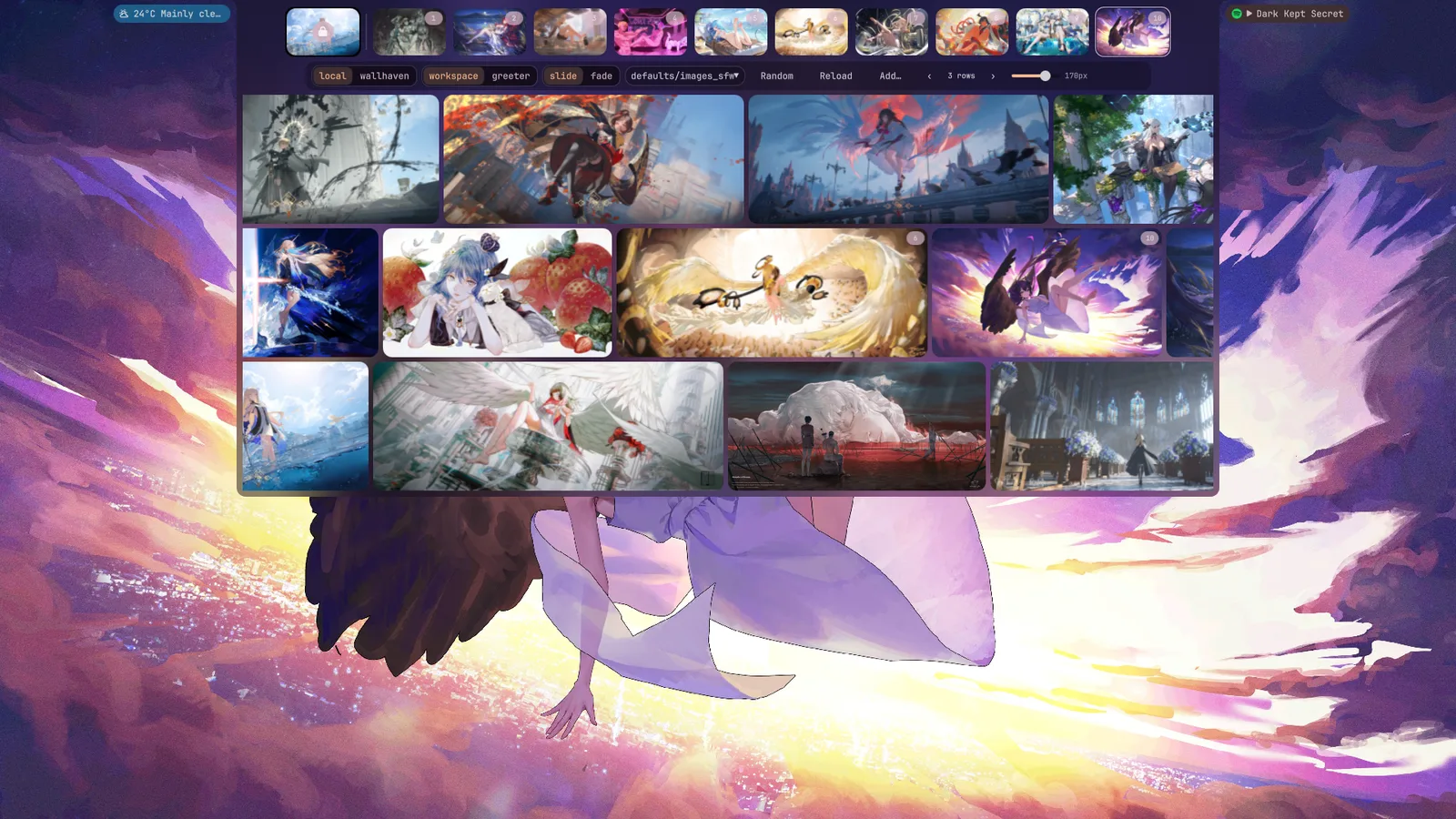
SUPER + W opens the wallpaper island in the bar. It provides:
- a target switch for workspace wallpapers or the greeter background;
- a category/provider filter and a masonry grid;
- a random wallpaper action;
- per-workspace badges showing where a wallpaper is already used;
- hover previews (after a one-second dwell);
- add and delete actions.
Applying works through WallEclipse:
walleclipse set <monitor> <workspace-id> <path>The picker resolves the focused monitor and the selected workspace, then calls
that command. For the greeter target it copies the file to
/etc/xdg/quickshell/archeclipse-greeter/greeter-wallpaper through pkexec,
because the greeter mirror is root-managed.
Per-workspace state#
WallEclipse keeps per-monitor state in:
~/.config/walleclipse/config/<monitor>/defaults.confEntries are w-<workspace-id>=<path> lines. A monitor can therefore show a
different wallpaper on each workspace, and the greeter can use its own. Do not
edit the file while the daemon is running without coordinating: writers use a
lock file next to the config, and unsynchronized writes can be lost.
Useful CLI commands:
walleclipse current                  # current state
walleclipse list                     # configured wallpapers
walleclipse set HDMI-A-1 2 ~/.config/wallpapers/custom/foo.png
walleclipse reload                   # re-read config and re-apply
walleclipse transition fade          # or slide; persisted by the daemon
The exact text format of current and list is owned by WallEclipse; TODO:
document the output fields for the version packaged in the AUR.
Wallhaven provider#
The picker can search Wallhaven instead of local folders. Search and download
are implemented in
~/.config/quickshell/archeclipse/scripts/wallhaven.py:
- categories are a 3-bit string for general/anime/people;
- purity is a 3-bit string for sfw/sketchy/nsfw;
- sorting supports
date_added,relevance,random,views,favoritesandtoplist; - optional resolution, ratio and minimum-resolution filters;
- downloaded files land in
~/.config/wallpapers/wallhaven/and are applied through the same local pipeline.
An API key is optional for SFW results and unlocks NSFW results. Enter it in
Settings → API Keys. The provider is selected in the picker and persisted as
wallpaperProvider.
Transitions and theming#
The picker can switch workspace transitions between slide and fade. The
setting is written to the shell settings file and to WallEclipse
(walleclipse transition <name>), then the daemon reloads.
When Dynamic Theme Colors is enabled (default on), applying a workspace
wallpaper regenerates the palette from that image through ColorEclipse. This
updates ~/.cache/coloreclipse/colors.scss, which the shell, terminal and Qt
apps consume. For the greeter target, the picker runs
scripts/normalize-greeter-palette.py and installs the result as the greeter's
palette with pkexec; scripts/sync-greeter.sh mirrors the rest of the greeter
configuration.
See Theming and Customization for the full color pipeline.
Troubleshooting#
| Symptom | Check |
|---|---|
| Wallpaper does not change | pgrep -a walleclipse; daemon log /tmp/walleclipse.log |
| No animated wallpaper | mpvpaper installed? video extension supported? |
| Picker is empty | files under ~/.config/wallpapers with a supported extension |
| Colors do not follow | Settings → Theme → Dynamic Theme Colors; coloreclipse get |
| Greeter wallpaper unchanged | greeter mirror sync and pkexec permission |
| Video thumbnails missing | ffmpeg in PATH; cache directory writable |